 CourseDraw
 Display and export
Choose what appears on the canvas, save Public and Build presets, and use them when exporting a course plan.
What you see on the canvas is not always what should go on a printout or a published course plan. Display controls the canvas right now. Presets store two ready-made choices you can use on export without having to change the view each time.
Display
Open Display in the toolbar. Check what should be visible:
- Show grid
- Show guides — ride direction and Show guides — sideways
- Show distances between obstacles
- Show jump direction arrow
- Show arena dimensions
- Show obstacle info, and under it Number, Type, Height, and Description
The left menu also has Layer, where you can show or hide everything drawn on the course plan.
Presets
Presets are two saved view modes stored in the course plan:
- Public — for course plans published to riders and others. This is used when exporting to Equipe.
- Build — for build plans used by the course crew. The Build preset is applied automatically on the public build-plan page.
- Open Display and click Presets.
- Select the Public or Build tab.
- Check the display options, the layers, and which ride paths should appear in that preset.
- Copy from current view copies what the canvas shows right now into the open tab.
- Close the dialog. The settings are saved in the course plan.
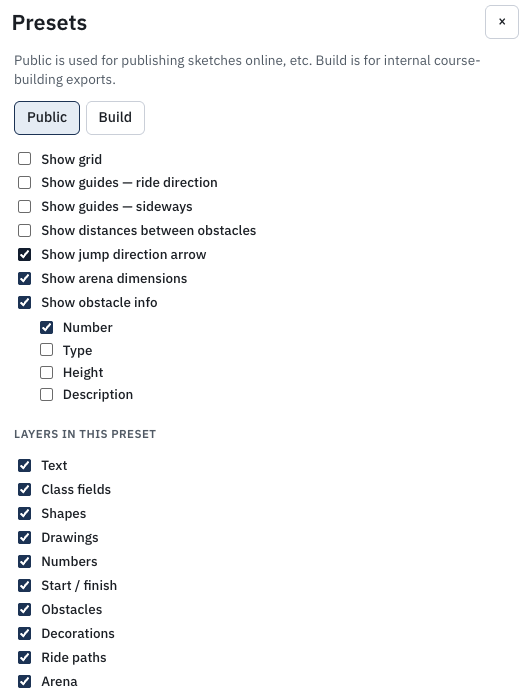
A ride path that is unchecked in the preset does not appear on that export. Length, obstacles, and times from the path remain, and can still sit on the course plan as placeholders.
By default Public includes ride path 1 (and ride path 2 when the course is split into two phases). Build includes no ride path.
Export and print
File → Export, then PDF or PNG. Choose which mode the file should use:
- Current view — exactly what is on the canvas
- Public — according to the Public preset
- Build — according to the Build preset
File → Print uses the current view, with no preset choice.
More about file formats and publishing is in Export.