 CourseDraw
 Ride path and time allowed
Draw the ride path, adjust the anchor points, and calculate time allowed from the measured length.
The ride path measures the course in metres. The length, together with the tempo under Class, is used to calculate time allowed.
Draw the first path
- Place the fences first. See Place obstacles.
- Choose Ride path in the toolbar.
- Drag through the fences, in the order they are ridden. Release when the path is done.
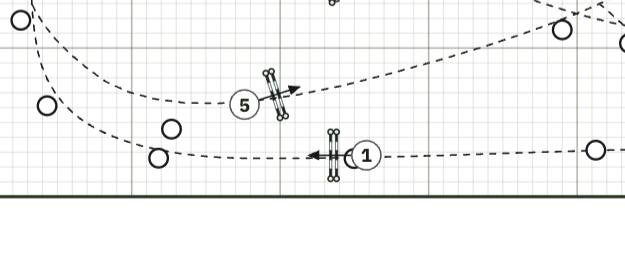
As soon as you release, the path is smoothed into gentle turns. The stroke also becomes anchor points you can adjust individually. The program counts length, obstacles, and efforts along the drawn path.
Move, add, and remove points
Switch to Select and click the ride path. The points appear on the line.
- Move — drag a point. Click it first so it fills in.
- Add — double-click the line, or select a point and choose Add point nearby.
- Remove — select the point and press Delete or Backspace, or choose Remove point. At least two points must remain.
- Extend — drag the dashed end handles, or choose Continue drawing and drag on from the nearest end. Esc cancels.
Smooth turns (1–10) rounds the curve between points without moving the points themselves.
Length and time allowed
Open Class. Under the ride path, Measured shows the length of the line.
Length can be adjusted manually if the measured length should be replaced, for example after measuring on the course. Time allowed is calculated from length and Tempo. Obstacles and Efforts are filled in automatically but can also be adjusted when needed.
How to place length and times on the course plan itself: Class and placeholders.